Tools for construction and surveying teams, with prices
Alongside bespoke builds, AI Metric designs, builds and runs its own software for the built environment, starting with Note Metric, the meeting and survey app. Four products and a handful of free tools, each with what it does, what it costs and where to start.
Weather Metric: site weather against your limits, free on iPhone and the web
Featured | Note Metric
FeaturedOn the App Store
Never miss a meeting note again.
Tap record. Talk. Note Metric writes the minutes, and every action, decision and risk plays back the exact moment it was said. Built for construction, engineering and the built environment.
Nothing to type
Talk. Every word is transcribed and written up for you.
One tap on any screen, round the table or on a call.
02
Mark what matters
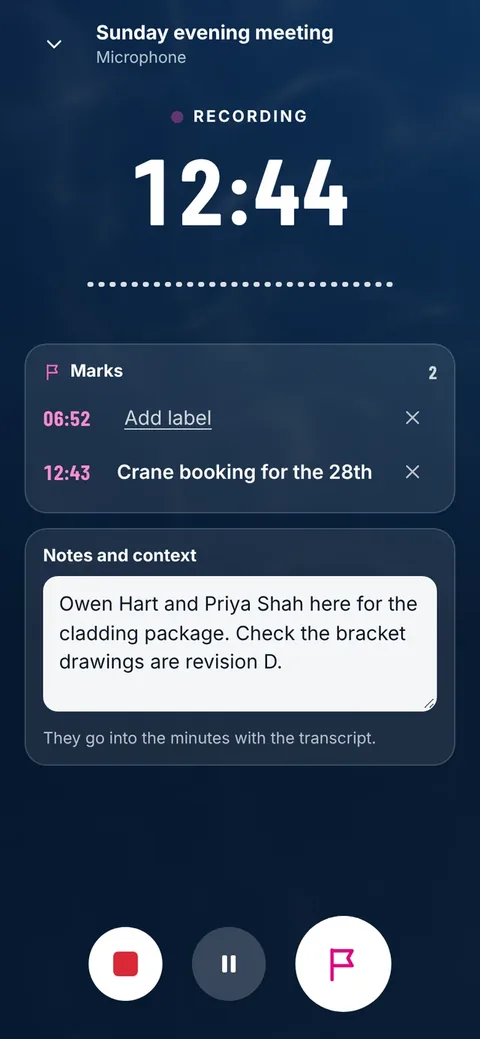
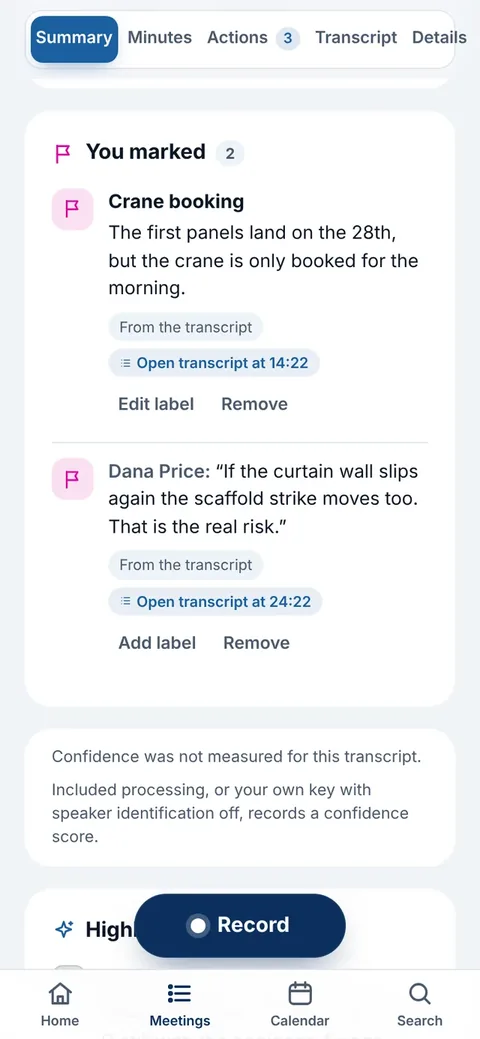
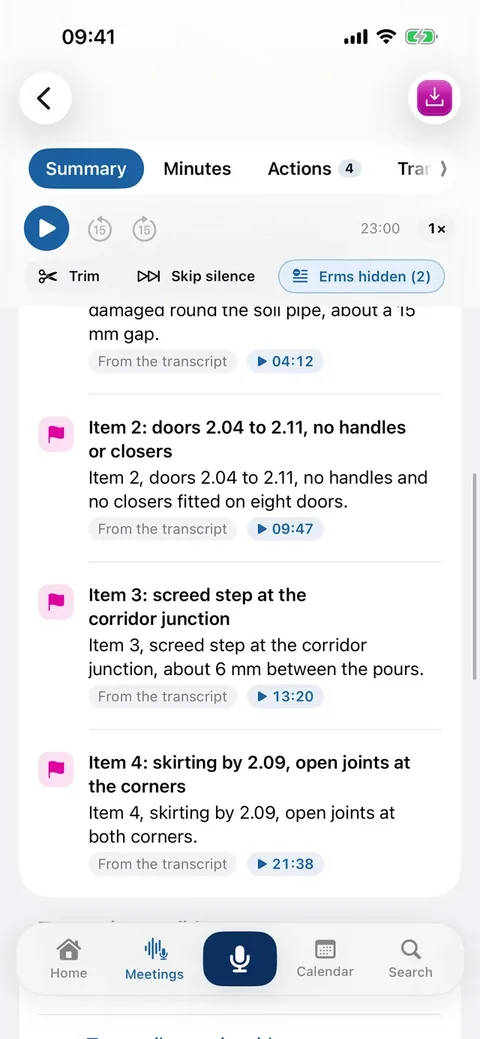
Tap the flag when something matters, pause when you need to, and type notes while it records.
03
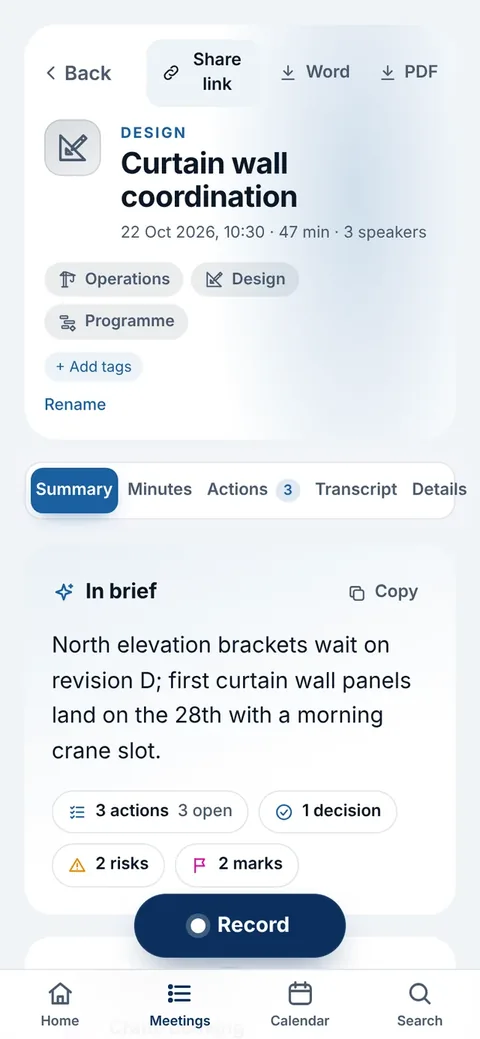
The brief first, then the detail
Actions with owners only where they were said, decisions, risks and open questions.
04
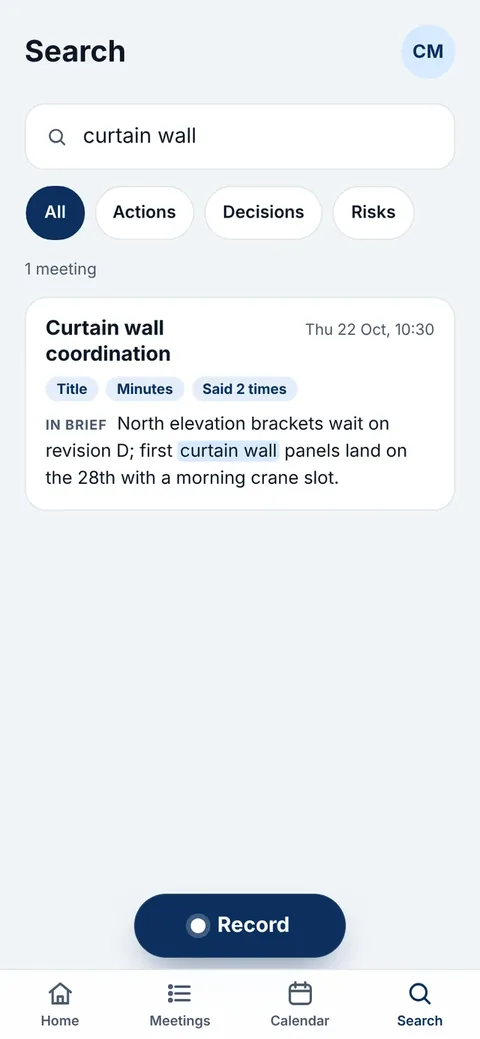
Search the way you’d ask
Ask it like a colleague. Every result opens at the line it was said in.
05
Your day, in one place
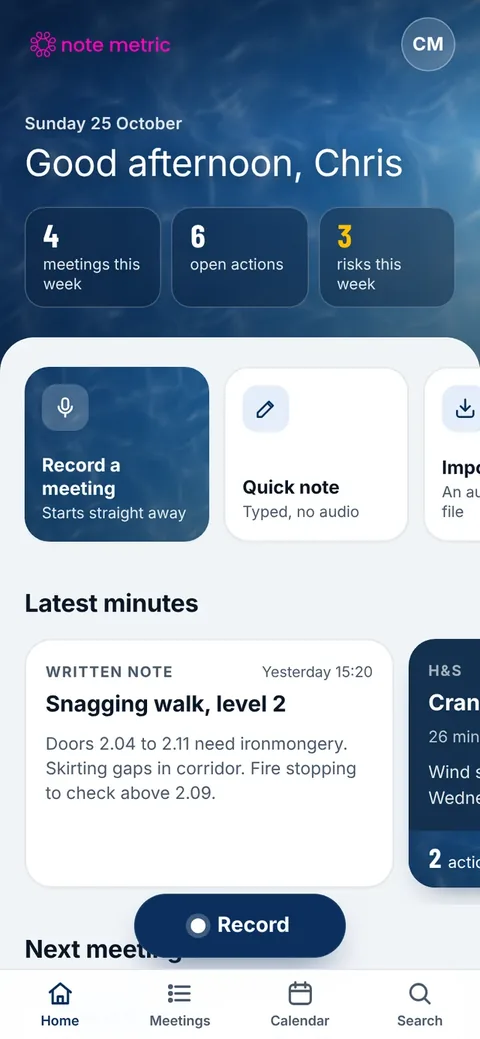
This week’s meetings, open actions and risks, and the latest minutes as cards.
Step 01
Record is on every page
One tap on any screen, round the table or on a call.
Step 02
Mark what matters
Tap the flag when something matters, pause when you need to, and type notes while it records.
Step 03
The brief first, then the detail
Actions with owners only where they were said, decisions, risks and open questions.
Step 04
Search the way you’d ask
Ask it like a colleague. Every result opens at the line it was said in.
Step 05
Your day, in one place
This week’s meetings, open actions and risks, and the latest minutes as cards.
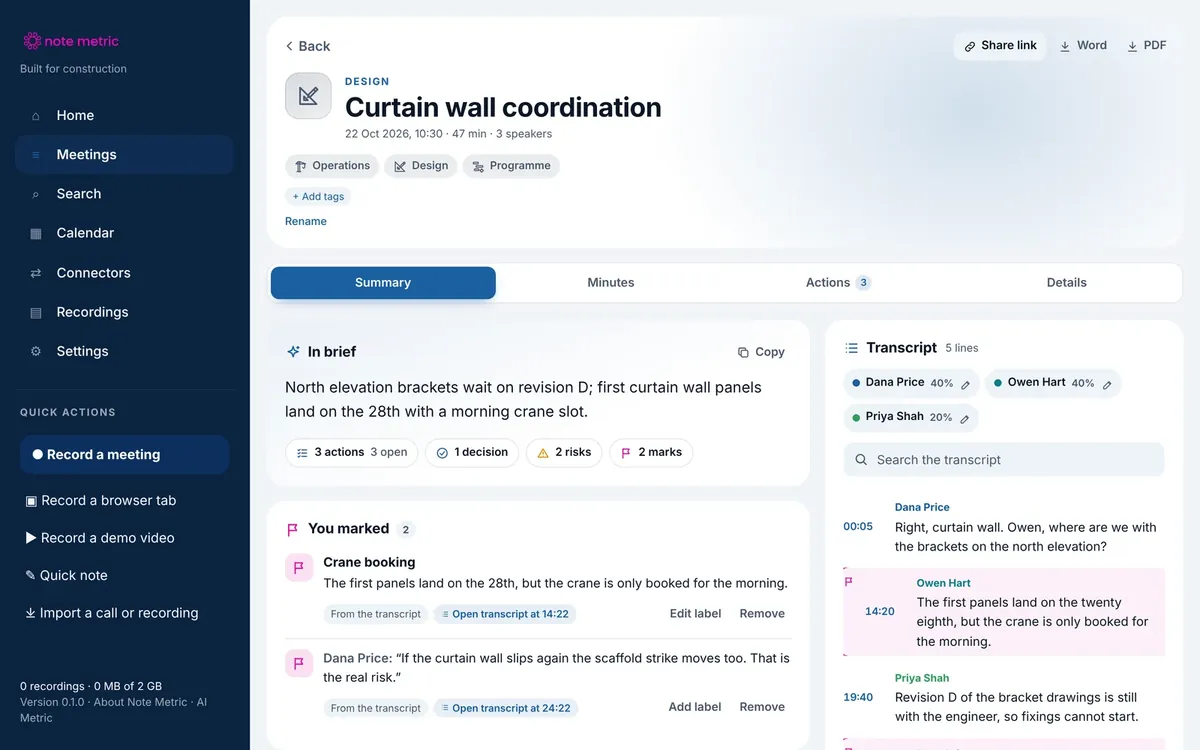
Then it’s on your computer. Names, notes, transcripts, minutes and marks sync to the browser, with the summary and transcript side by side. Open it in your browser
Survey mode · Pro and above
Walk it. Say it. Measure it.
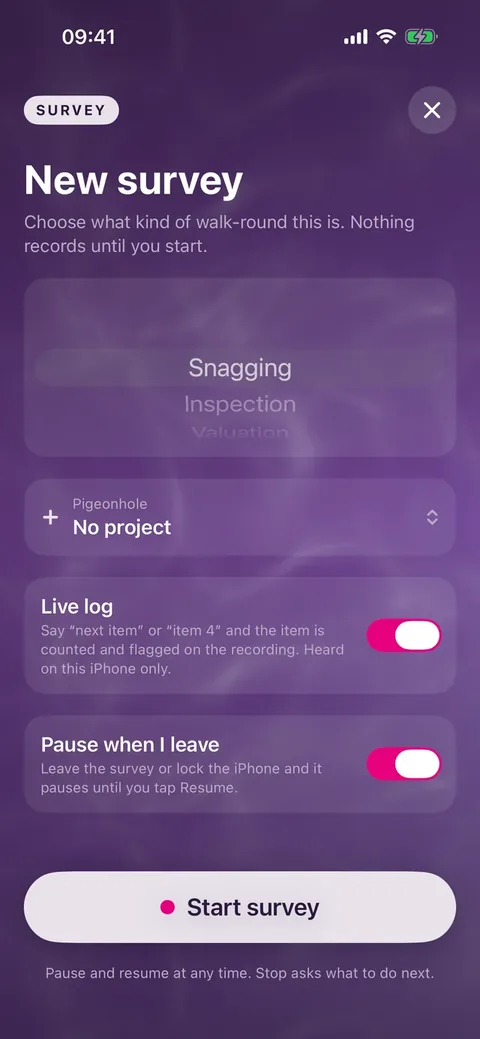
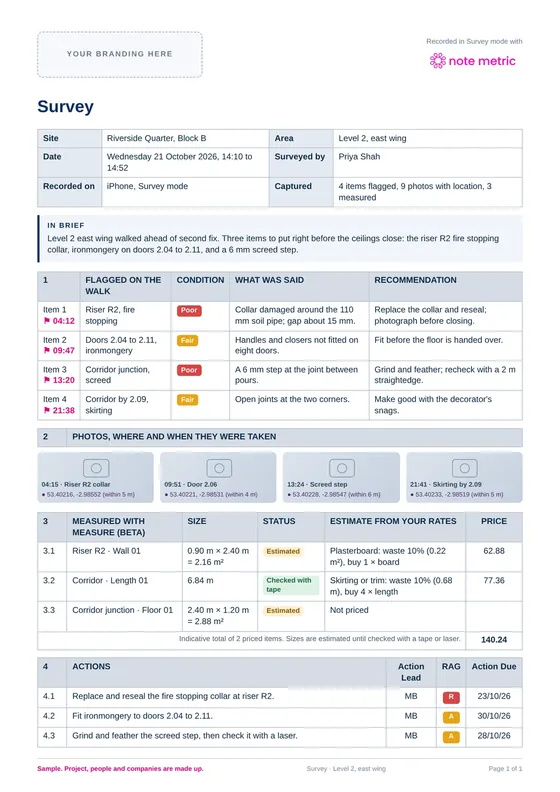
Snagging, inspections, valuations, surveys, dilaps, TDDs and handovers. Walk the site and talk, and stop when you are done: the draft report is written for you.
+ Flags as you speak
Say “next item”, “item 4” or “snag three” and it is counted and flagged on the recording.
+ Photos that know where
Each survey photo keeps where it was taken, when you allow location, and its moment in the recording.
+ Measure (beta)
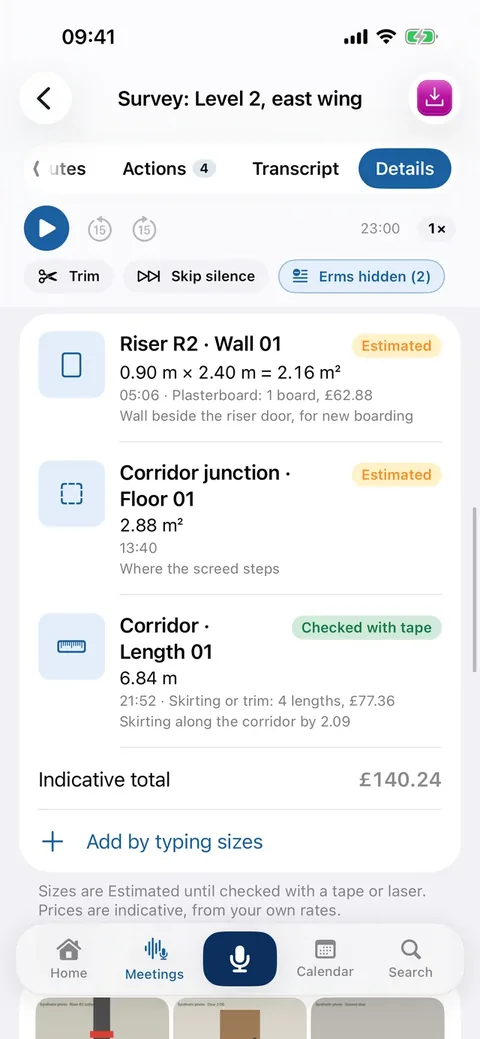
Lengths, walls, floors and volumes with the camera. Each size stays Estimated until you check it with a tape or laser.
+ Priced from your rates
Type your pack price and labour rate, and an indicative price is worked out as you go.
+ Into any report
The PDF, a plain Word file for your letterhead, a zip with the photos and measurements, or Send to Report Metric.
+ Pauses when you leave
Lock the phone or step out and the survey pauses, so it never records for hours by mistake.
Prices in pounds sterling. AI Metric Ltd is not VAT registered, so no VAT is added. Hours are recording hours processed a month. Summaries have a fair use limit.
What comes out
Progress meetings, team meetings, surveys
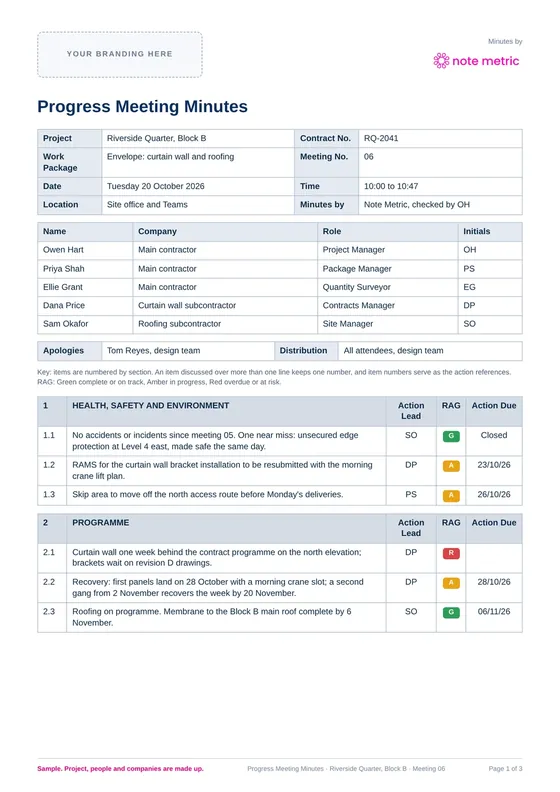
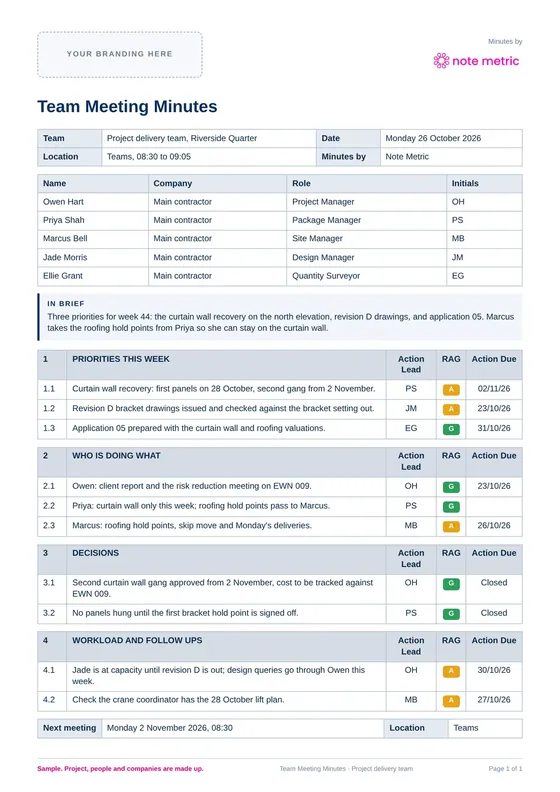
Three made-up samples of what one recording becomes. Open any of them as a PDF.
Put the phone on the table and get on with the meeting
Nobody has to take notes. Note Metric records the meeting and writes the minutes, with an owner and a date only where someone said one. You check them and send them.
Try it now
Type a site note. Watch the minutes write themselves.
Pick an example or type your own, the way you would scribble it after a meeting. It runs in your browser and nothing you type leaves this page.
Meeting minutes
Made-up names and projects in the examples
✓ 3 actions◎ 1 decision△ 1 risk6 items
1
HEALTH, SAFETY AND ENVIRONMENT
Action Lead
RAG
Action Due
1.1
Near miss at level 4, edge protection reinstated the same day.
G
Closed
1.2
Sam will book the skip move before Monday.
Sam
A
Mon
2
PROGRAMME
Action Lead
RAG
Action Due
2.1
Curtain wall is a week behind on the north elevation, which puts the crane booking at risk.
R
2.2
Agreed the first panels land on the 28th with a morning crane slot.
G
28th
3
DESIGN AND INFORMATION
Action Lead
RAG
Action Due
3.1
Owen to chase the revision D bracket drawings by Friday.
Owen
A
Fri
4
COMMERCIAL
Action Lead
RAG
Action Due
4.1
Priya to issue the variation for the extra brackets.
Priya
A
This is a quick taste from simple rules. Note Metric writes the minutes from the recording itself, names an owner only where someone said it, and links every line to the moment it was said. Get it on the App Store
Part 1 | Where each one fits
Which tool covers which part of the day?
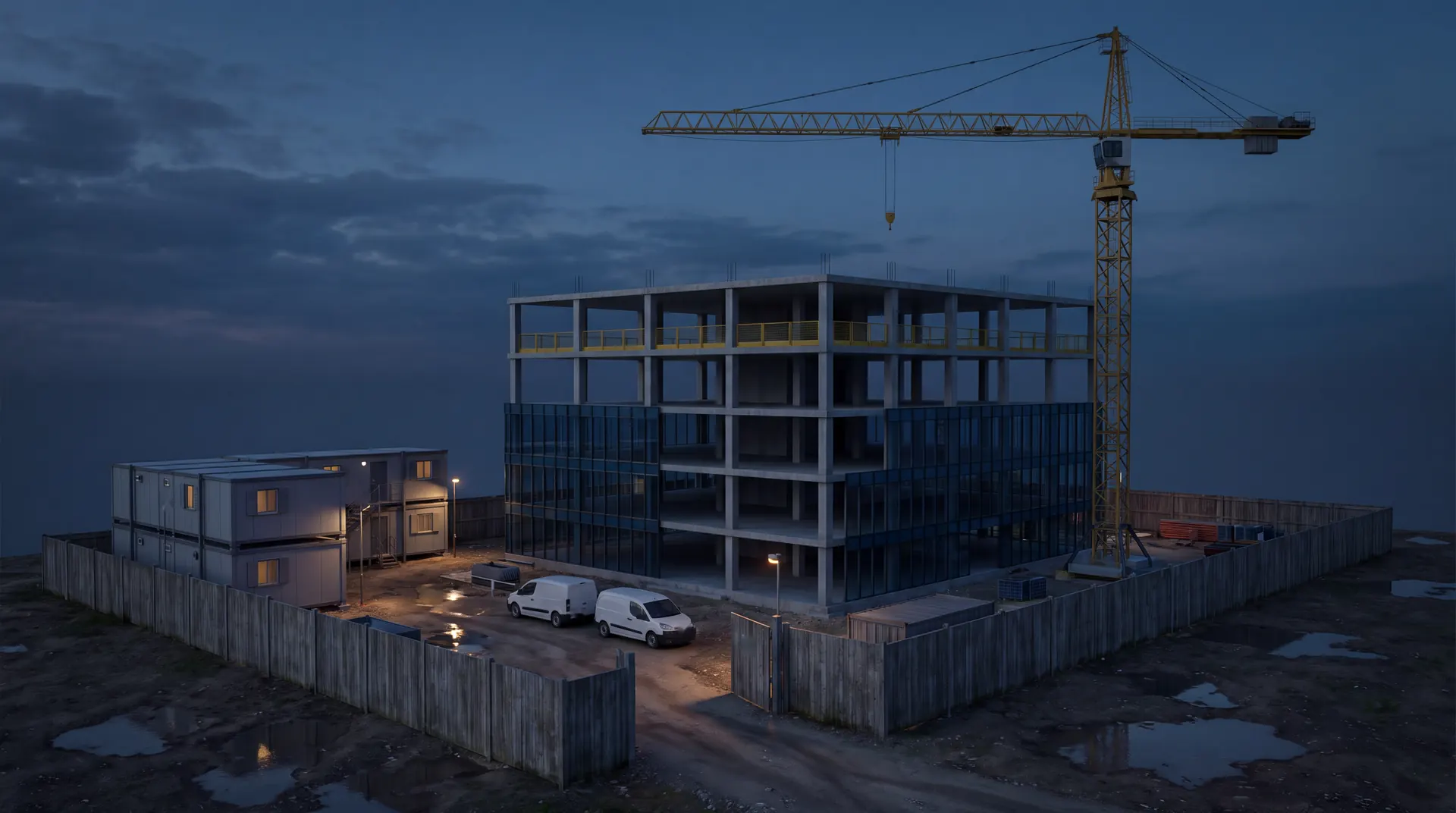
One working day on a job, from the morning forecast to the evening diary. Each tool covers one part of it and works on its own, so you can start with whichever costs you the most time. Tap a dot on the site.
The day’s forecast against your crane, pour and rain limits, in your inbox.
08:30
Record the progress meeting. Minutes, actions and decisions written up from the recording.
14:00
Walk the snagging round, then check and sign a drafted report instead of typing one.
18:00
The day’s WhatsApp messages, photos and voice notes written up as the site diary.
Part 2 | The other products
What do Report Metric, Construction Metric and Weather Metric do, and what do they cost?
Every price below is the published price, written in full. Where your firm pays for hosting or AI usage separately, it says so.
Early access
What does Report Metric do?
Drafts snagging and condition reports from site notes, walk-round recordings and photos, in your firm’s own wording and branding.
Report Metric turns a walk-round into a report your surveyor signs. It reads transcripts, typed notes and up to 300 photos, groups the items the way your firm reports, numbers and captions the photos, and cites where every item came from. Anything it cannot find in the notes is flagged rather than guessed. Nothing is issued until a named person signs it off, and unsigned copies are marked DRAFT.
Who it is for: Building surveyors, inspectors and consultancies writing snagging and condition reports. Runs on: a web browser.
+Snagging and condition reports now; technical due diligence, 10 year PPM plans and EPC improvement plans in development
+Every item cites the note, recording or photo it came from
+Your reviewer enters the costs; totals by element and timescale are worked out for you
+Word and PDF exports in your branding
+A full history of the draft and every later edit
What does it cost?
Free
£0
Standard layout, delivered as a watermarked PDF
Bespoke build
From £2,950, one-off
Your report types, wording, rating scales, logo and colours, with Word and PDF exports
Extra report type
£950 each, one-off
Another report your firm writes, built to your format
Maintenance
From £195 a month
Keeps your workspace maintained and up to date
On a bespoke build, hosting and AI usage are paid by your firm at cost, with nothing added. Our fees cover our time. Not VAT registered, so no VAT is added.
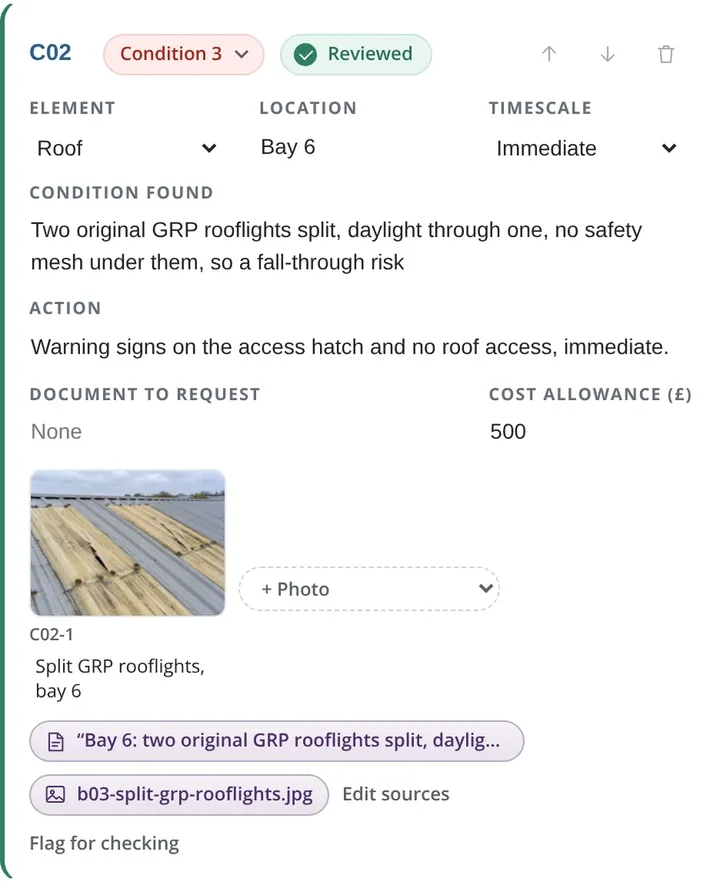
One drafted condition item, with its photo numbered and its sources attached for the reviewer.
Illustration made with Higgsfield
On the roof
Take the photo, say what you see
Report Metric numbers the item, rates it and puts it in the report in your firm's own wording. Nothing is issued until a named person signs it off.
Try Report Metric
Drop a photo, say what you see, get a report item
Add a photo from your phone or computer, type what you would say on the walk-round, and it is numbered, rated and placed in a condition report. Your photo stays on your device.
Drag a photo here, or
A quick taste from simple rules. In Report Metric your firm’s own wording, rating scale and branding are set up for you, and nothing is issued until a named person signs it.
Condition report
Draft · 1 item · costs to be entered by the reviewer
C01Condition 3ImmediateNeeds review
Element
Location
Rooflights
Bay 6
Condition found
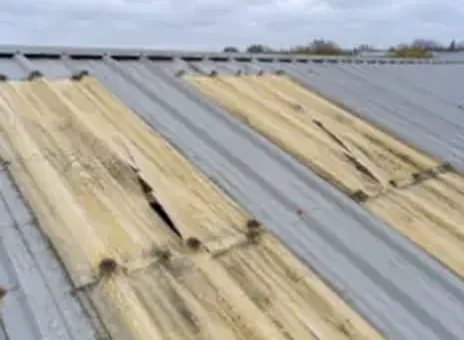
Two original GRP rooflights split, daylight through one, no safety mesh under them.
Action
Make safe now and arrange repair.
C01-1
Rooflights, bay 6
Source: your note
Live
What does Construction Metric do?
Turns your site WhatsApp group, meetings, emails and photos into a dated daily site diary, written every evening.
Construction Metric captures what a site already says, sends and photographs, files it by project, day and person, and writes a dated, tamper-evident site diary each evening. There is no new app for the site team to learn: the WhatsApp group becomes the diary, and anything else can be forwarded, dropped in or typed.
Who it is for: Contractors and site teams who need a daily record that stands up later. Runs on: WhatsApp, email and a web portal.
+WhatsApp capture, with no change to how the team works
+Meeting transcription, with agreed actions logged against owners
+Emails, files and photos filed to the right project and day
+A full diary, a one-page summary and a searchable project narrative
+Weather evidence, early warning drafts and planned against actual export to P6, Asta and MS Project
+Data held in the EEA and never used to train AI models
What does it cost?
Listen
£199 a site a month
Plus £399 one-off setup; WhatsApp capture, email-in, voice notes and the evening diary
Record
£397 a site a month
Plus £799 one-off setup; adds the site app, meeting recorder and located photos
Contract
£697 a site a month
Plus £1,399 one-off setup; adds contract questions answered with the clause, and dispute bundles
First month
Setup fee only
Run it on one live job for a month; cancel inside the month and nothing more is due
Priced per site with unlimited users. AI usage is billed separately at published rates, under a monthly ceiling you set (a typical site runs at about £2 to £4 a month). Six month minimum term after the first month.
A sample diary it wrote from a day of WhatsApp messages, photos and voice notes. Made-up project.
Free
What does Weather Metric do?
Free UK site weather on iPhone and the web, with the forecast checked against your own crane, pour, MEWP and rain limits.
Set the limits a site works to once, and Weather Metric checks the forecast against them. Any breach in the next 48 hours shows as a time window, with the peak gust and when it arrives. It gives the facts and leaves the decision with you.
Who it is for: Site managers, crane coordinators, concrete and roofing teams in the UK. Runs on: iPhone (App Store, iOS 16 or later) and web browser.
+Limits for cranes, MEWPs, concrete pours, mortar, coatings and rain, all editable
+Several national weather models averaged, including the Met Office, with how far they agree
+A 07:00 daily brief against your limits
+A day by day weather record with measured rainfall from the nearest Environment Agency gauge, as CSV
+No sign-up and no account; limits are saved on your device
Scan with your iPhone camera to open Weather Metric on the App Store.
Weather Metric for a Manchester site: the forecast, your limits for the next 24 hours, then every 3 hours.
Live Weather Metric
Check your site’s weather, right here
Type a postcode or a town. You get the real Weather Metric for that place: today against the crane, MEWP, pour and rain limits, the next 48 hours, and the record. It gives you the facts and leaves the call with you.
The place you type goes to Weather Metric, our own weather service, to find the forecast. Free, no sign-up.
Type a place and the live forecast opens here
What is free to use, and what is in beta?
Two free tools anyone can use today, and two in private beta for firms who ask.
Free
The Drawing Board
Describe a repetitive workflow and see it mapped and sorted into what is worth automating, what AI can help with and what should stay human.
Drop in delivery tickets, cube results and your existing Excel register, and the register keeps itself: every pour and cube logged and anomalies flagged.
Search a curated directory of facade, envelope and fire-stopping products, build a pack, and download a manifest PDF recording every document’s source, revision and check history.
Put in your own numbers. It uses my 20/60/20 rule of thumb: your people capture what happened and sign it off, and the software does the 60% in the middle.
20
4 h
2
£45
Time it takes now
80 hours a month
Time you could get back
48 hours
a month, about 6.4 working days, or 24 hours each
People 20%, platform 60%, people 20%
Worth, at your hourly cost
£2,160 a month
Where I’d start: Report Metric built around your own report: a bespoke build from £2,950, with a free plan to try first.
A rule of thumb from your own figures, not a promise. On the call we measure one real document from start to finish, so the number you plan with is yours.
Part 3 | Who builds them
I’ve been in construction for more than twenty years. Now I build the tools.
I’m Chris, and I run AI Metric. I’ve spent more than twenty years in Tier 1 construction delivery, leading project teams on jobs from a humble £8m up to £400m. I’ve worked across commercial, procurement, design and engineering teams as well as operations, with a lot of that time on complex facades and the building envelope.
I’ve always had a technical mind, and I’ve always known a job runs on relationships and trust. You only get the right answer when the people round the table trust each other enough to say what’s really going on. That’s what I bring to a build: I know how your work actually gets done, so I build around it.
+20+ years
years in Tier 1 construction delivery
£m£8m to £400m
the biggest project I’ve led a team on, up from a humble £8m
2
iPhone apps, both on the App Store
6
websites built and live
What I’ve built
Apps, websites, platforms, agents and automations
All of these are running now. Have a look at any of them.
📱
iPhone apps
I’ve designed and built two iPhone apps and taken both through Apple’s review. Note Metric is for meetings and surveys, and Weather Metric is free site weather. Both are on the App Store now.
I build the websites too: this one, the four product sites, and client sites that keep themselves up to date. I write them so buyers can find them, and so can the AI assistants buyers now ask.
Full web platforms with logins, databases and a record of who changed what. The WhatsApp site diary, the report drafting workspace, and the CRM, bookings and enquiries I run this business on.
Agents that get on with the work in the background: a site diary written every evening, minutes written from a recording, a client’s gig dates and videos pulled onto his site every night, and an agent that edits a website from a plain English request.
I’ve learnt a few things on site that change how software should work. Here are six of them, and what each one changed in my tools.
What I learnt on site
Progress meetings are minuted in a set format, and everyone looks for their name in the action column.
What I built because of it
→So Note Metric writes progress minutes in that format, with numbered items, Action Lead, RAG and Action Due, and it only names an owner if someone actually said it.
What I learnt on site
When there’s a dispute, what was written down at the time is what counts.
What I built because of it
→So every line in my tools links back to where it came from: the moment in the recording, the message or the photo. The site diary is dated, and any change to it shows.
What I learnt on site
Site teams won’t learn another app, but they all use WhatsApp.
What I built because of it
→So Construction Metric records from the WhatsApp group they already use. Nobody has to change how they work.
What I learnt on site
Whoever signs the report carries the liability, not the software.
What I built because of it
→So Report Metric drafts the report and flags anything it can’t find, but nothing goes out until a named person signs it, and the reviewer puts in every cost.
What I learnt on site
A forecast isn’t a decision, and nobody wants an app telling a crane supervisor what to do.
What I built because of it
→So Weather Metric shows the forecast against your own limits and leaves the decision with the people on site.
What I learnt on site
If a file doesn’t land where the project team looks, nobody opens it.
What I built because of it
→So Construction Metric gives every file an ISO 19650 register name, and it drops straight into your common data environment.
20/60/20people, platform, people
How I shape a build
How much does the AI actually do?
I build everything around the same split, because it’s how site work actually gets signed off.
20% people: your team records what happened by talking, taking photos or typing, the way they already do.
60% platform: the software sorts, drafts, numbers, cross-references and flags anything it couldn’t find.
20% people: someone on your team checks it, corrects it and signs it before it leaves the office.
Drafts snagging and condition reports from site notes, walk-round recordings and photos, in your firm’s own wording and branding.
Free to try, bespoke builds from £2,950
On a bespoke build, hosting and AI usage are paid by your firm at cost, with nothing added. Our fees cover our time. Not VAT registered, so no VAT is added.
Turns your site WhatsApp group, meetings, emails and photos into a dated daily site diary, written every evening.
From £199 per site a month, plus setup
Priced per site with unlimited users. AI usage is billed separately at published rates, under a monthly ceiling you set (a typical site runs at about £2 to £4 a month). Six month minimum term after the first month.
Free UK site weather on iPhone and the web, with the forecast checked against your own crane, pour, MEWP and rain limits.
Free
Free. Nothing to pay.
The Drawing Board
Describe a repetitive workflow and see it mapped and sorted into what is worth automating, what AI can help with and what should stay human.
Free
Free. Nothing to pay.
Concrete cube tracker
Drop in delivery tickets, cube results and your existing Excel register, and the register keeps itself: every pour and cube logged and anomalies flagged.
Free
Free. Nothing to pay.
Metric Takeoff
Measure and price drawings in the browser, with every quantity traced back to its mark on the drawing.
Private beta
Access on request
Pack Builder
Search a curated directory of facade, envelope and fire-stopping products, build a pack, and download a manifest PDF recording every document’s source, revision and check history.
Private beta
Access on request
Need one built around your own templates?
Most AI Metric work is bespoke: the same engines, set up on your documents, wording and systems, in accounts in your name. Start with a £1,500 discovery and AI implementation workshop, taken off the build price if you go ahead. See how bespoke builds work.
Four products and a few free tools. Note Metric records meetings and surveys and writes the minutes. Report Metric drafts snagging and condition reports for a surveyor to sign. Construction Metric turns a site WhatsApp group into a daily site diary. Weather Metric checks the forecast against your site limits, free. The Drawing Board and the concrete cube tracker are free, and Metric Takeoff and Pack Builder are in private beta.
What does Note Metric cost?
Note Metric is free to try with a small monthly allowance. Paid plans are per user, billed monthly: Starter £8.99 a month for 10 hours, Pro £18.99 a month for 25 hours with summaries, Survey mode and Measure, and Elite £34.99 a month for 30 hours with premium transcription. Hosting and transcription are included.
What does Report Metric cost?
Report Metric has a free plan that produces a standard, watermarked PDF. A bespoke build for your firm starts at £2,950 one-off, each extra report type is £950 one-off, and maintenance starts at £195 a month. Hosting and AI usage are paid by your firm at cost, with nothing added.
What does Construction Metric cost?
Three tiers, each per site a month with unlimited users: Listen £199 plus £399 setup, Record £397 plus £799 setup, and Contract £697 plus £1,399 setup. AI usage is billed separately at published rates under a monthly ceiling you set, typically about £2 to £4 a site a month. You can run it on one live job for a month first, paying only the setup fee.
Is Weather Metric really free?
Yes. No sign-up, no account and no subscription, on iPhone and the web. Your limits are saved on your device.
Do the tools work together?
Each one works on its own, so you can start with one. Links between them, such as sending a Note Metric survey straight to Report Metric, are planned.
Can you build a version around our own templates?
Yes, that is most of what AI Metric does. The first step is a paid discovery and AI implementation workshop, £1,500, taken off the build price if you go ahead. Base builds start at £2,950.
Who makes these tools?
AI Metric Ltd, a UK company (number 16448110) run by Chris M., a construction project manager with more than twenty years of Tier 1 delivery. Every tool is designed, built and run by AI Metric.
Credits: the site illustration and the two short films on this page were made by AI Metric with Higgsfield. They are illustrations, not a real site or customer. The app screenshots and screen recordings are real.
See a report drafted from site notes, in your own template.





 Early access